
ABBYY AI
Description
ABBYY AI is perfect popular choice for individuals and businesses that want smarter ways to work with documents. It uses advanced technology to understand text, analyze information and help people manage their work efficiently. Many people appreciate how it simplifies tasks that normally take much longer times.
The popularity of ABBYY AI has increase because it merges speed, accuracy and easy to use. Users from different industries, including education, finance and administration, have found it valuable. Besides, the software keeps updating to meet modern needs, making it more safe than ever.
Also, this AI is not just about recognizing text, it is about improving workflows and productivity. It can read scanned files, convert them into different formats, and even extract important information automatically. As a result, it has become a go to tool for those who want to save time and clear errors.
There are many other AI apps and tools like kofax AI that work in simple ways. You can try this tool as well.
What is ABBYY AI?
This AI is an artificial intelligence software that focuses on document understanding and data getting data. It can read text from images, PDFs and other file formats with good accuracy. In the same way, it helps convert printed or handwritten content into editable digital formats.
Moreover, This AI is made to decrease manual work. For instance, it can scan receipts, forms or contracts and automatically capture important details. This feature makes it especially useful for businesses that handle a large amount of paperwork every day.
Together with its text reading ability, this AI also offers tools for checking data. This combination of features allows users to make faster decisions and simplify their tasks. Added to that, the software supports multiple languages, making it good for users.
Key Features
This AI comes with several powerful features that make it stand out. First, it has Optical Character Recognition (OCR), which allows it to find text in scanned documents and images. Also, it checks high correctness, which is important for professional use.
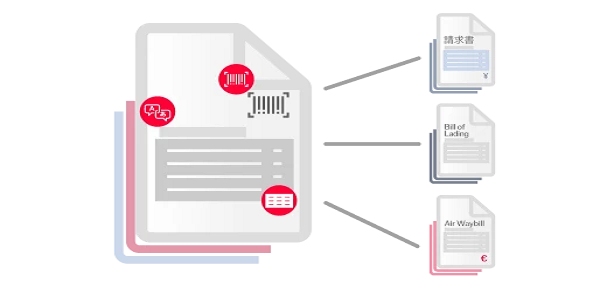
Second, it offers data extraction, which helps users pull out important information from large documents automatically. For example, it can find dates, names or amounts in receipts without manual input.
In addition, this AI provides document conversion features. It can change PDFs, images and scanned files into Word, Excel or other formats. This flexibility is very helpful for users who need to work on documents easily.
Furthermore, the software has cloud integration options, allowing users to save, share, and process files online. Together with security features, this makes this AI both practical and safe for business use.
Additional Features
Besides its main functions, this AI has advanced analytics tools. These help businesses understand document data, spot trends and makes reports easily. More importantly, it supports group processing, which means multiple files can be processed at once.
Also, the software includes mobile support, enabling users to scan and process documents directly from their smartphones. Added to that, this AI has AI powered proofreading, which checks for errors and improves document quality automatically.
Moreover, this AI offers integration with other software like CRM systems, accounting tools and workflow platforms. This helps organizations save time by connecting this AI with the software they already use.
Review
Users generally have a positive view of ABBYY AI. Its speed, accuracy and easy to use are often liked in reviews. Besides, people like that it reduces repetitive tasks, allowing them to focus on more important work.
However, some reviews mention that advanced features may take time to learn. In the same way, small businesses may find the full version a little expensive. Yet, many believe the investment is good value it because of the productivity it gives.
Furthermore, customers appreciate the constant updates and improvements that keep this AI strong. More importantly, its compatibility with multiple file formats and languages adds to its value.
Advantages
- High accuracy in text recognition
- Time saving automation for document handling
- Supports multiple languages and formats
- Easy connection with other tools
- Cloud support for remote work
Besides these, this AI also helps reduce human errors and increases overall doing things faster.
Disadvantages
- Advanced features can be hard for beginners
- Some plans may be costly for small businesses
- Occasional errors with very poor quality scans
Added to that, learning all features may take time, but once learned well, it greatly improves productivity.
Examples of Use
This AI is used in various fields:
- Education Teachers scan books and notes to make digital copies.
- Finance Banks process invoices and forms automatically.
- Business Companies extract data from contracts and reports.
- Healthcare Hospitals manage patient records digitally.
In the same way, freelancers use this AI to simplify work like converting scanned documents into changeable formats.
Tips and Tricks
- Always use clear scans to improve reading speed.
- Use group processing for multiple files to save time.
- Explore cloud features to access documents anywhere.
- Regularly update the software for best performance.
- Combine this AI with other tools to streamline workflows.
Pros and Cons
Pros:
- Easy to use
- Saves time
- Reduces errors
- Multi format support
- Cloud integration
Cons:
- Learning curve for advanced features
- Cost for full versions
- Needs good quality documents for best results
How to Download ABBYY AI
Downloading ABBYY AI is simple:
- Visit the official ABBYY website.
- Choose the plan that fits your needs. Free trial options are available.
- Click the download button for your device (Windows or mobile).
- Follow the installation instructions.
- Once installed, start exploring features and importing documents.
Moreover, ensure your device meets the minimum system requirements for easy performance.
Conclusion
This AI is a powerful tool for anyone who deals with documents regularly. Its combination of Optical Character Recognition [ OCR ], data getting and automation makes it a productivity booster. In addition, its easy to use interface, cloud support and multi language capabilities make it suitable for both individuals and businesses.
Furthermore, with consistent updates and improvements, ABBYY AI continues to grow in popularity. More importantly, it saves time, reduces errors and streamlines workflows efficiently. For anyone looking to simplify document handling, ABBYY AI is definitely valuable trying.
FAQs
Q1: What types of documents can ABBYY AI process?
It can handle PDFs, images, scanned forms, handwritten notes and more.
Q2: Does it support multiple languages?
Yes, ABBYY AI supports a wide range of languages for recognition and extraction.
Q3: Can I use it on mobile devices?
Yes, ABBYY AI has mobile apps for scanning and processing documents on the go.
Download links
How to install ABBYY AI APK?
1. Tap the downloaded ABBYY AI APK file.
2. Touch install.
3. Follow the steps on the screen.




