
SlideDog AI
Description
In todays fast paced digital world a good presentation is more than just a few slides. Audiences expect visuals, videos, live interactions and easy delivery. Whether you are a corporate professional, educator, trainer or event host, the way you present your content matters as much as the content itself.
This AI is designed to solve this problem. It allows you to combine different media types PowerPoint slides, PDFs, videos, websites and more into one seamless presentation playlist. No more switching apps mid presentation or losing audience attention.
More AI visit AI presentation maker
What is SlideDog AI?
SlideDog AI is a presentation management software that lets you present multiple content formats without converting them into a single format. It works as a playlist based presentation tool meaning you can combine slides, videos, PDFs and live web pages into one easy presentation sequence.
The AI in SlideDog AI refers to its smart presentation management and audience interaction capabilities. It helps presenters,
- Organize content efficiently
- Maintain presentation flow
- Engage audiences with polls and Q&A
- Control delivery professionally
In simple terms, this AI is a one stop platform for managing, delivering and controlling modern presentations.
Key Features of SlideDog AI
This AI comes packed with features that make it ideal for business, education and events.
1. Multi Format Support
Unlike traditional presentation tools this AI supports
- PowerPoint (PPT/PPTX)
- PDF files
- Word documents
- Videos (MP4, WMV, etc.)
- Images
- Prezi presentations
- Web pages
This flexibility means you do not have to convert files or compromise on content quality.
2. Playlist Based Presentations
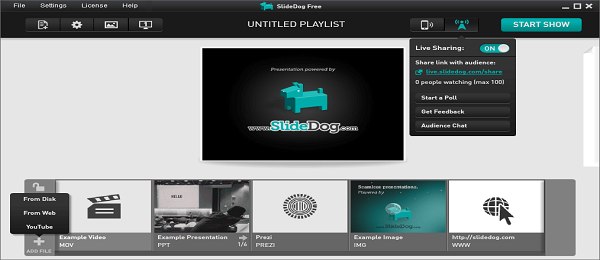
This AI operates like a playlist. You can arrange slides, videos and web pages in any order. During the presentation, SlideDog automatically plays them in sequence, ensuring a good and professional flow.
3. Live Sharing Feature
With live sharing your audience can follow your presentation in real time from their own devices. This is especially useful for,
- Online webinars
- Hybrid meetings
- Large conferences
Participants do not need any special software just a web link.
4. Audience Interaction Tools
This AI includes features for active engagement,
- Live polls to gather opinions
- Q&A sessions for real time feedback
- Interactive quizzes to maintain attention
These tools help keep audiences involved instead of passive listeners.
5. Presenter View and Notes
The Presenter View gives you,
- Private speaker notes
- Upcoming slide previews
- Time tracking
- Full control over playlist navigation
This boosts confidence and helps maintain a professional delivery.
6. Seamless Format Switching
Switching between PowerPoint, videos and web pages during a live presentation usually interrupts the flow. This AI removes this problem, providing easy transitions between different formats.
7. Remote Control via SlideDog App
The SlideDog mobile app allows presenters to control presentations directly from their phone,
- Start and pause your playlist
- Advance or rewind slides
- Play or pause videos
- Access speaker notes
- Navigate between files effortlessly
This gives freedom to move around while presenting.
How It Works
This AI works in four simple steps,
Step 1: Create a Playlist
Import all your presentation files into SlideDog. Arrange them in the order you want to present.
Step 2: Organize and Preview
Preview your playlist, adjust transitions, and make sure everything is in the right sequence.
Step 3: Start Presentation Mode
Click Start Presentation and SlideDog will manage all file transitions automatically.
Step 4: Enable Live Sharing (Optional)
Generate a live sharing link to allow remote participants to follow along.
The best part is SlideDog plays each file in its original format, so your content always looks perfect.
Advantages
1. Flexible Multi Format Presentations
No more converting files. You can present any file type without losing formatting or quality.
2. Professional Flow
SlideDog ensures easy transitions between slides, videos and web pages, giving a polished presentation experience.
3. Audience Engagement
Interactive tools like polls, Q&A and quizzes keep your audience involved.
4. Hybrid Ready
Works equally well for in person and online audiences.
5. Saves Time
No need to merge files manually or juggle multiple software programs.
6. Mobility
The SlideDog app allows full control from your smartphone.
Disadvantages
No tool is perfect. Here are some limitations of SlideDog AI
- Windows focused: Mac users may face restrictions.
- Learning curve: Beginners may need some time to get used to playlist management.
- Internet dependency: Live sharing and audience interaction require a stable connection.
- Paid features: Some advanced tools are only available in the Pro version.
Use Cases and Examples
This AI can be applied in many professional and educational contexts.
1. Business Meetings
Combine:
- Sales PowerPoint
- Product demo videos
- Market research PDFs
- Website demos
2. Academic Teaching
Educators can use,
- Lecture slides
- Educational videos
- Research papers
- Online references
3. Conferences and Events
Event organizers can manage,
- Multiple speaker presentations
- Sponsor videos
- Live polls
- Audience Q&A
4. Sales and Marketing
Sales teams can showcase,
- Product brochures
- Demonstration videos
- Pricing sheets
- Website demos
- without interruptions, giving a easy, professional pitch.
Limitations
Even though This AI is powerful, some limitations exist,
- Not a slide creation tool: You still need PowerPoint or other software for designing slides.
- Performance requirements: Heavy playlists may need a strong computer.
- Editing limits: SlideDog cannot edit content within files.
- Full features require Pro subscription: Free version has limitations.
Cost Structure and Availability
This AI offers two main plans,
Free Version
- Basic playlist features
- Limited live sharing
- Standard presentation tools
Pro Version
- Advanced audience interaction tools
- Unlimited live sharing
- Priority support
- Full access to all features
Pricing depends on subscription type (monthly or yearly). Download is available through the official SlideDog website.
Pro and Cons
Pros
- Supports multiple file formats
- Smooth transitions between content types
- Interactive audience tools
- Ideal for hybrid events
- Easy playlist organization
Cons
- Windows focused
- Some features behind paywall
- Cannot create slides
- Internet required for live sharing
How to Download SlideDog AI
- Visit the official SlideDog website.
- Click the Download button.
- Choose your version Free or Pro.
- Install the software on your Windows PC.
- Create an account to activate features.
Pro tip: Always download from the official site to ensure security.
SlideDog Mobile App
The SlideDog app turns your smartphone into a remote control for presentations:
- Start your playlist remotely
- Advance or go back slides
- Play/pause videos
- Access speaker notes
- Navigate between files seamlessly
This is perfect for presenters who want mobility and full control.
Review
From a professional standpoint, This AI is one of the best presentation management tools available in 2026. It is,
- User friendly once you understand playlist management
- Flexible for combining multiple formats
- Interactive with live polls, Q&A and audience feedback
- Hybrid ready for both in person and online events
Overall, its a great tool for corporate professionals, educators and event organizers who want to deliver easily, professional and engaging presentations.
Conclusion
SlideDog AI solves a major problem faced by modern presenters: managing multiple types of content during live presentations. Its playlist system, interactive features and mobile app control make it an ideal solution for professional, hybrid and educational settings.
While it has some limitations especially for Mac users it remains a reliable, time saving tool that improves audience engagement and presentation quality.
If you often handle complex presentations, SlideDog AI is worth considering in 2026.
FAQs
1. Is SlideDog AI free?
Yes, there is a free version with limited features. Paid Pro version unlocks advanced tools.
2. Can SlideDog AI create slides?
No. SlideDog is a presentation management tool. You still need PowerPoint, Canva or other software to create slides.
3. Does SlideDog AI work on Mac?
It is mainly designed for Windows. Mac users may have limitations.
4. Is SlideDog AI good for webinars?
Yes, especially with live sharing and interactive features.
5. Is SlideDog AI beginner friendly?
Yes, but beginners may need some time to understand playlist management and interactive tools.
Download links
How to install SlideDog AI APK?
1. Tap the downloaded SlideDog AI APK file.
2. Touch install.
3. Follow the steps on the screen.




